System Requirements
Mia-Care P4SaMD is validated to develop SaMD. For additional documentation or information, contact us or check the FAQ section.
This page lists the system requirements for deploying P4SaMD, including the prerequisites for Mia-Platform IDP and the ALM tool. It also describes the installation process carried out by the Mia-Care team.
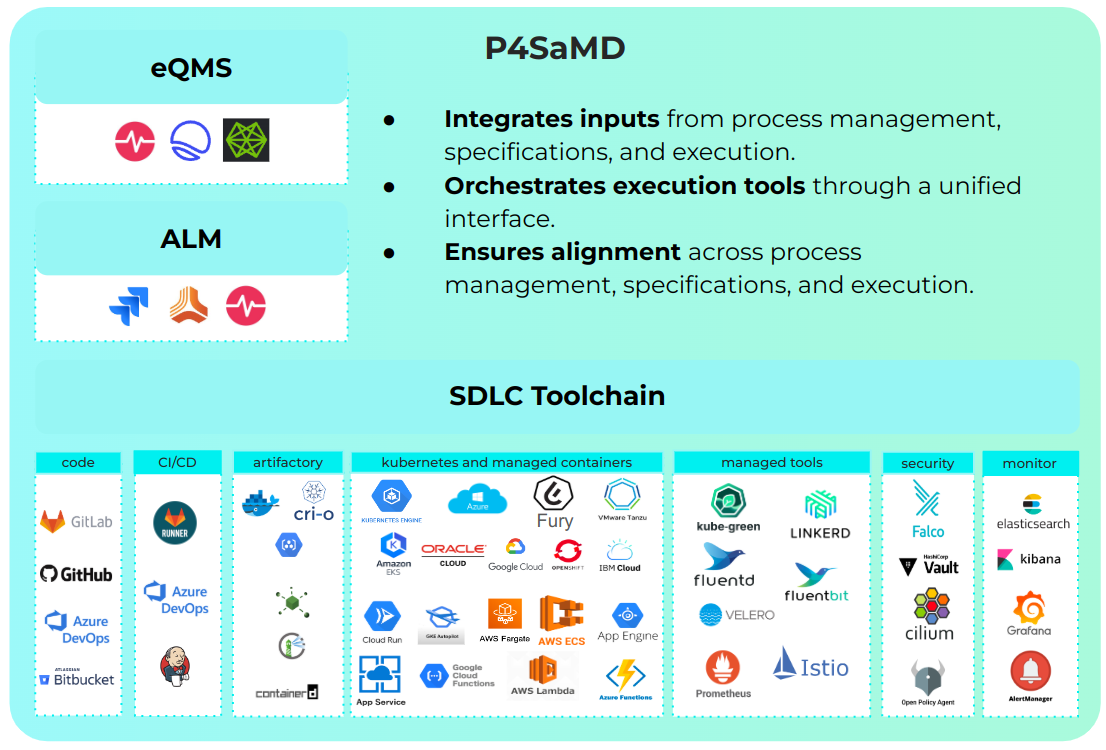
Supported tools
The table below shows the external tools officially supported for each Mia-Care P4SaMD version.
| Category | Name | Version | Mia-Care P4SaMD version |
|---|---|---|---|
| IDP | Mia Platform IDP | v14.5.2 | 2.5.0 |
| DevOps | GitLab | v17.11.7 | 2.5.0 |
| ALM | Jira REST API | v2 | 2.5.0 |
Mia-Platform IDP Supported
The table below shows the minimum console version supported for each Mia-Care P4SaMD version.
| Mia-Care P4SaMD Version | State | Minimum Mia-Platform IDP Version |
|---|---|---|
| 2.0 | Supported | 13.5 |
| 1.0 | Deprecated | 11.0 |
System Requirements
Mia-Care P4SaMD is installed on behalf of Mia-Platform IDP, so the requirement list covers components of both. Each component lists its supported tools.
| Required for | Tool | Version | Mandatory | |
|---|---|---|---|---|
| Mia-Platform IDP Mia-Care P4SaMD | Auth Provider | Okta | SaaS | Yes |
| GitLab | > 14.x | |||
| GitHub | > 3.x | |||
| Microsoft | SaaS | |||
| Azure AD B2C | SaaS | |||
| Bitbucket Server | > 8.x | |||
| Keycloak | SaaS | |||
| Mia-Platform IDP | Git Provider | GitLab | > 14.x | Yes |
| GitHub | > 3.x | |||
| Azure Repos | SaaS | |||
| Bitbucket Server | > 8.x | |||
| Mia-Platform IDP | Secret Manager | GitLab | SaaS | Yes |
| Vault | SaaS | |||
| Mia-Platform IDP | CI/CD Tool | GitLab CI Runners | > 14.x | Yes |
| GitHub Actions | SaaS | |||
| Azure Pipelines | SaaS | |||
| Jenkins | SaaS | |||
| Mia-Platform IDP Mia-Care P4SaMD | NoSQL database | MongoDB Enterprise | > 5 <= 7 | Yes |
| Mia-Platform IDP Mia-Care P4SaMD | Redis Cache | Redis | >= 6 <= 7 | Yes |
| Mia-Platform IDP Mia-Care P4SaMD | Runtime | Kubernetes | >= 1.21 <= 1.30 | Yes |
| Mia-Platform IDP Mia-Care P4SaMD | Object Storage | Google Cloud Storage | SaaS | Yes |
| S3-Compatible Object Storages | SaaS | |||
| MongoDB | SaaS | |||
| Mia-Care P4SaMD | Application Lifecycle Manager (ALM) | JIRA | SaaS | Yes |
| Mia-Platform IDP | Key Management Service | Google Cloud Platform | SaaS | Optional |
| Local Key | SaaS | |||
| Mia-Platform IDP | Container image registry | Any container image registry | SaaS | Optional |
Kubernetes Cluster Setup
The Kubernetes cluster must be configured with the components below, which cover the correct operation and monitoring of the application. Each component lists a set of recommended tools. Customers can customize the Kubernetes cluster setup based on tools available in their portfolio.
| Component | Mandatory | Recommended Tools |
|---|---|---|
| Ingress Controller | Yes | Traefik |
| Certificate Manager | Optional | cert-manager |
| Monitoring & Logging Stack | Optional | Grafana + Prometheus + Loki + Fluentd + Fluentbit |
| Disaster Recovery | Optional | Velero |
Enhanced workflow
Mia-Care P4SaMD requires all Console projects to use Enhanced Project Workflow, which uses GitOps integrations to provide observability and traceability over the project runtime.
Installation Procedure
Only Mia-Care's qualified personnel install Mia-Care P4SaMD. The procedure has the following stages:
-
System Requirements Check: Mia-Care personnel validate the system environment for compatibility and readiness. This step includes:
- Infrastructure Assessment: Verifying hardware and software configurations meet minimum requirements.
- Networking Validation: Checking that network settings meet the operational needs of Mia-Care P4SaMD.
- Security Checks: Verifying compliance with the relevant standards and securing the installation environment.
-
Installation of Mia-Platform IDP: Mia-Platform IDP (Integrated Development Platform) is deployed in the prepared environment and configured according to project-specific requirements.
-
Post-Installation Testing of Mia-Platform IDP: Testing confirms that the platform operates correctly. This includes:
- Functionality testing to confirm all features are accessible.
- Performance testing to ensure stability under expected workloads.
- Validation of integrations to confirm compatibility with the ecosystem.
-
Installation of Mia-Care P4SaMD: Once the Mia-Platform IDP installation is verified, the Mia-Care P4SaMD application is installed and configured for the intended use and the environment specifications.
-
Post-Installation Testing of Mia-Care P4SaMD: Testing of Mia-Care P4SaMD then validates that:
- Core functionalities and workflows operate as designed.
- Performance and responsiveness meet predefined benchmarks.
- Security measures are effectively implemented.
-
Installation and Operation Qualification Report: After all tests pass, Mia-Care personnel prepare the Installation & Operation Qualification Report. It is the formal evidence of a completed installation process and includes:
- A summary of activities conducted during the installation.
- Results of system checks and testing.
- Approval and sign-off by the Mia-Care team, certifying that the system is operational and meets quality standards.
For further information or support, contact Mia-Care's technical support team.